
Let’s start with a confession most online sellers never say out loud: “People land on my sales page every day. A few buy. The rest just… evaporate. I’ve no idea who they were, and I’ve no way to ask them back.”
If that sounds familiar, you’re not doing anything wrong. You just haven’t been shown how a ThriveCart sales funnel is meant to catch people on the way through. So let’s fix that, with pictures, and without the marketing jargon (well, with as little as humanly possible).
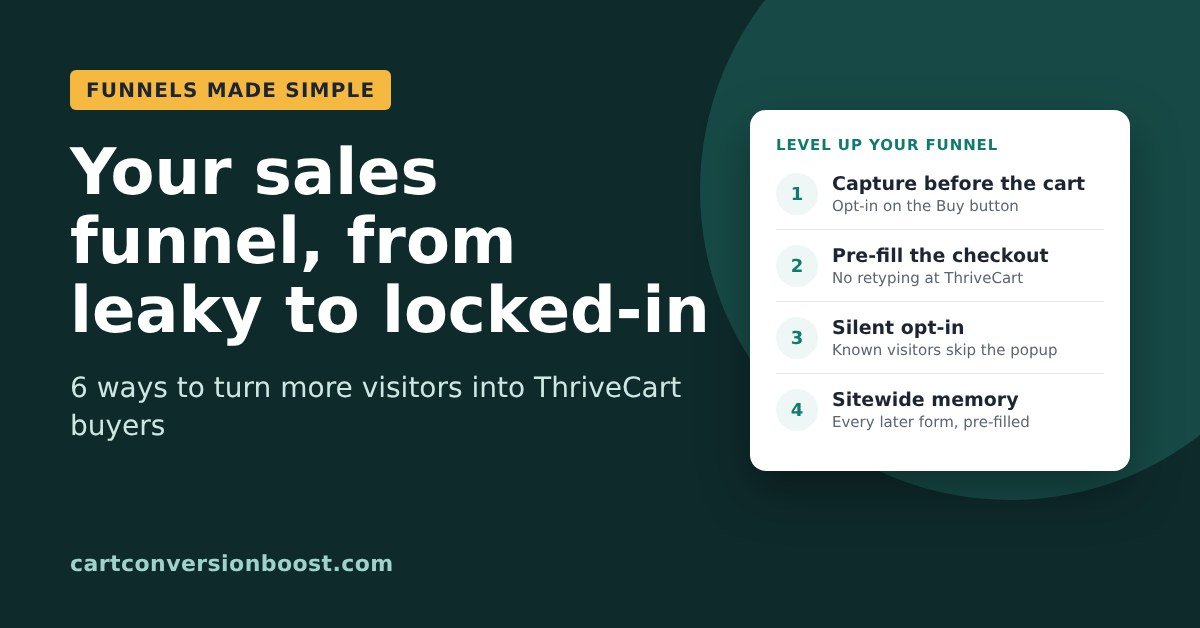
By the end of this post you’ll know what a funnel actually is, which kind you’re running right now, and six ways to turn more of your visitors into buyers, from the simplest fix up to the clever stuff.
So what actually is a funnel?
Picture the funnel in your kitchen drawer. Wide at the top, narrow at the bottom. You pour a lot in, and a smaller, more concentrated stream comes out the other end.

A sales funnel is exactly that, only with people instead of olive oil. At the wide top is everyone who lands on your page, fresh, new, unfiltered. At the narrow bottom are the people who’ve paid. In between are a few steps (a page to read, a button to click, a form to fill in), and at every step, some people drift away.
Your job isn’t to build a funnel with no leaks. That’s impossible: on average, 70.2% of people who reach an online checkout leave without buying (Baymard, 2026). That’s about 7 in every 10, and it happens to everyone. Your job is to do 3 things:
- Make every step easy, so fewer people drift away.
- Know who drifted, so you can catch them and pour them back in with a friendly reminder.
- Minimise the leaks. Stop them leaving and /or bring as many as possible back.
A quick jargon decoder before we go on, so nothing trips you up:
- Sales page: the page that explains your product and has the Buy button.
- Checkout: your ThriveCart page, where people type their details and pay.
- Opt-in: a small form that asks for a name and email.
- Lead: someone whose name and email you have, so you can follow up.
- Cart abandonment: when someone reaches the checkout and leaves without paying.
Right. Let’s look at some actual funnels.
The 2-step funnel (sales page, then checkout)
This is the simplest funnel there is, and it’s what most people start with. Someone reads your sales page, clicks Buy, and lands on your ThriveCart checkout. Two steps. Lovely.
The trouble is what happens when they leave at the checkout. ThriveCart’s own support team told me it only stores someone as a possible abandoned cart after they’ve typed in the name field and clicked back out of it, and then clicked into the email field, typed their email AND then clicked back out of it.
Plenty of people leave before they get that far. So in a plain 2-step funnel, most of the people who walk away stay complete strangers. You paid (in ads, content or sheer effort) to get them all the way to your till, and they left without so much as a wave.
Improvement 1: Add an opt-in form to your sales page
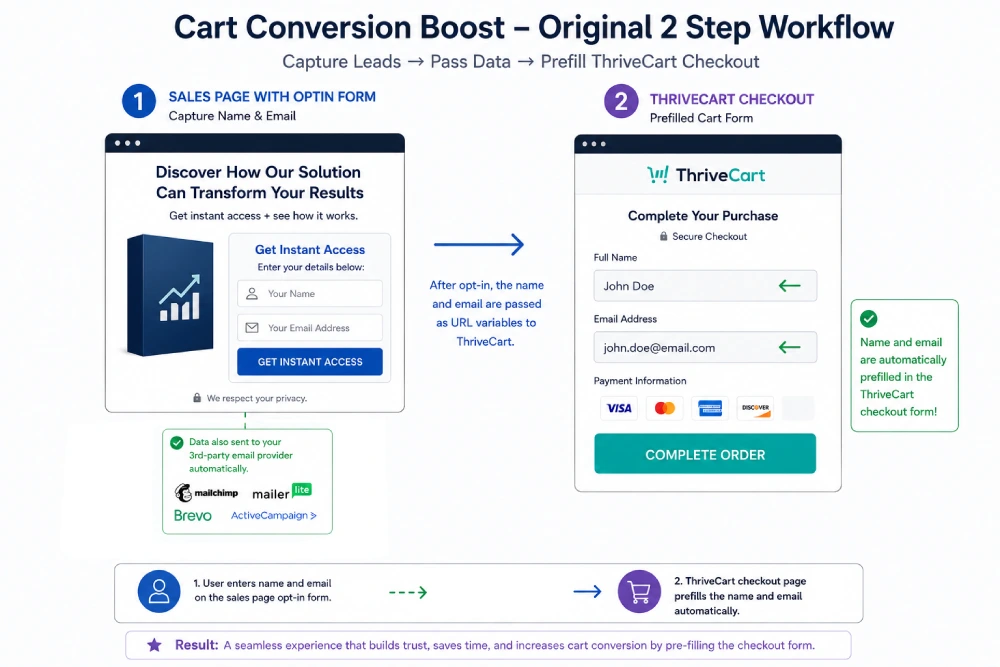
The first upgrade is to put a short opt-in form on the sales page itself. The visitor types their name and email, and two things happen. Their details go to your email provider (Mailchimp, MailerLite, Brevo, ActiveCampaign and so on), so now they’re a lead.
And Cart Conversion Boost (CCB) passes that same name and email into ThriveCart, so the checkout opens already filled in. No typing it all again.
The big win: if they abandon the cart, you know who they were, so you can follow them up with a reminder email and win some of those sales back.
The catch? A form sitting on a sales page asks for details before the visitor has decided anything. It’s easy to scroll straight past, and anyone who skips it and clicks Buy is back to being anonymous.
NOTE: We have a proven 5-step process that makes this all work seamlessly, so it all flows from sales page to order. More on how to do this later…
Improvement 2 (better): On clicking the Buy button, it opens a pop-up, with the opt-in form.
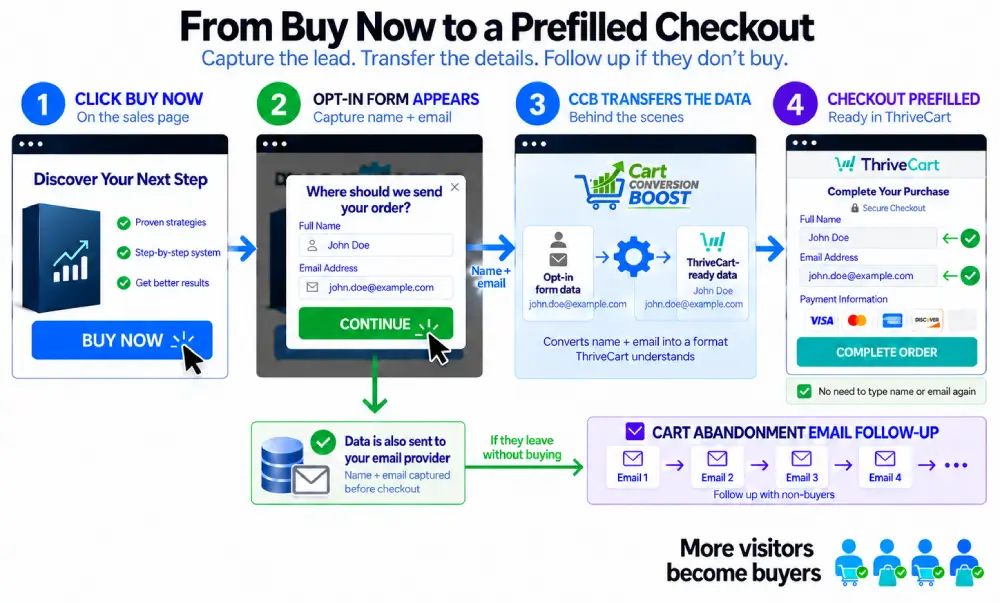
Here’s the smarter version. Don’t put the opt-in form on your sales page. Instead make the Buy button open a small pop-up that says something like “Where should we send your order?” with boxes for name and email. They fill it in, click Continue, and land on a ThriveCart checkout that’s already filled in for them.
Why is this better? Timing. You’re asking at the exact moment they’ve decided to buy, so it feels like the first step of the checkout rather than a newsletter sign-up.
And because everyone who clicks Buy goes through it, you capture 100% of all cart visitor leads.
If someone wanders off before paying, their details are already with your email provider, ready for your cart abandonment follow-up.
“But isn’t that an extra step?” Technically, yes. But because Cart Conversion Boost fills in the checkout, it’s not extra typing. They type their name and email once, in the pop-up, and that’s it.
And because they initiated that popup with their click of the Buy button, they feel compelled to complete it – which more people do!
The 3-step funnel (squeeze page, sales page, checkout)
Lots of sellers put a step before the sales page: a squeeze page. That’s a short page offering something free (a guide, a checklist, a mini course; marketers call it a “lead magnet”) in exchange for a name and email. Then the visitor goes on to the sales page, then to the checkout.
Good news if this is you: you already have their name and email before they get anywhere near the cart, so you can follow up.
The niggle is different. They gave you their details on the squeeze page, and then ThriveCart asks them to type it all in again. Every extra box at a checkout is one more chance for someone to sigh, check their phone and never come back.
Improvement 3: Carry their details all the way to the checkout
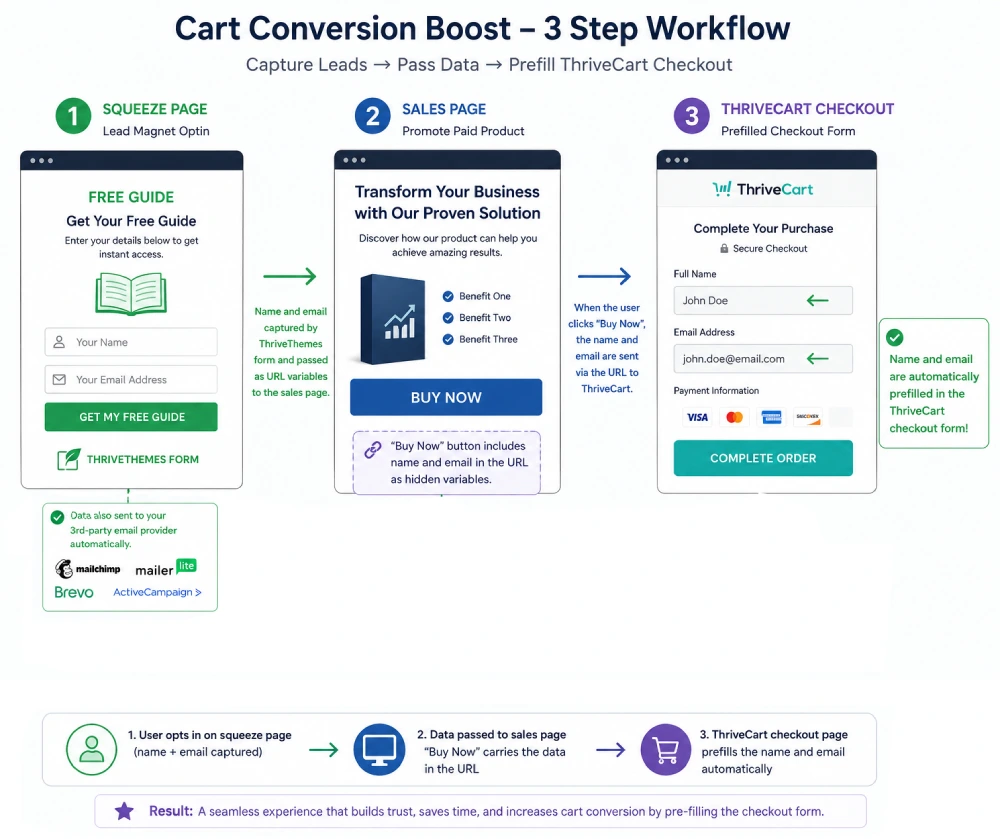
Because you already captured the lead on the squeeze page, Cart Conversion Boost simply carries the name and email through to the sales page, and when they click “Buy Now” button, the checkout opens with their details already in place. They opted in once, and they never have to type it again. Smooth.
Improvement 4 (better): Add a cart opt-in, and pre-fill it
Here’s a question worth asking: “I already have their email. Why would I ask for it again?”
Because your lead magnet list tells you who downloaded a freebie. It doesn’t tell you who clicked Buy. Someone who reached your checkout yesterday is a very different person from someone who grabbed your free guide six weeks ago, and they deserve a very different email. One gets “you left something in your cart”; the other gets your usual newsletter.
So the better setup is a second opt-in on the Buy button (the same pop-up as Improvement 2) that adds people to a separate list used purely for cart abandonment. Now your cart-recovery emails only go to the people who actually reached the checkout.
“But won’t they be annoyed typing their details for a third time?”
They would. Which is why Cart Conversion Boost has a feature called “Pre-fill the Opt-in“.
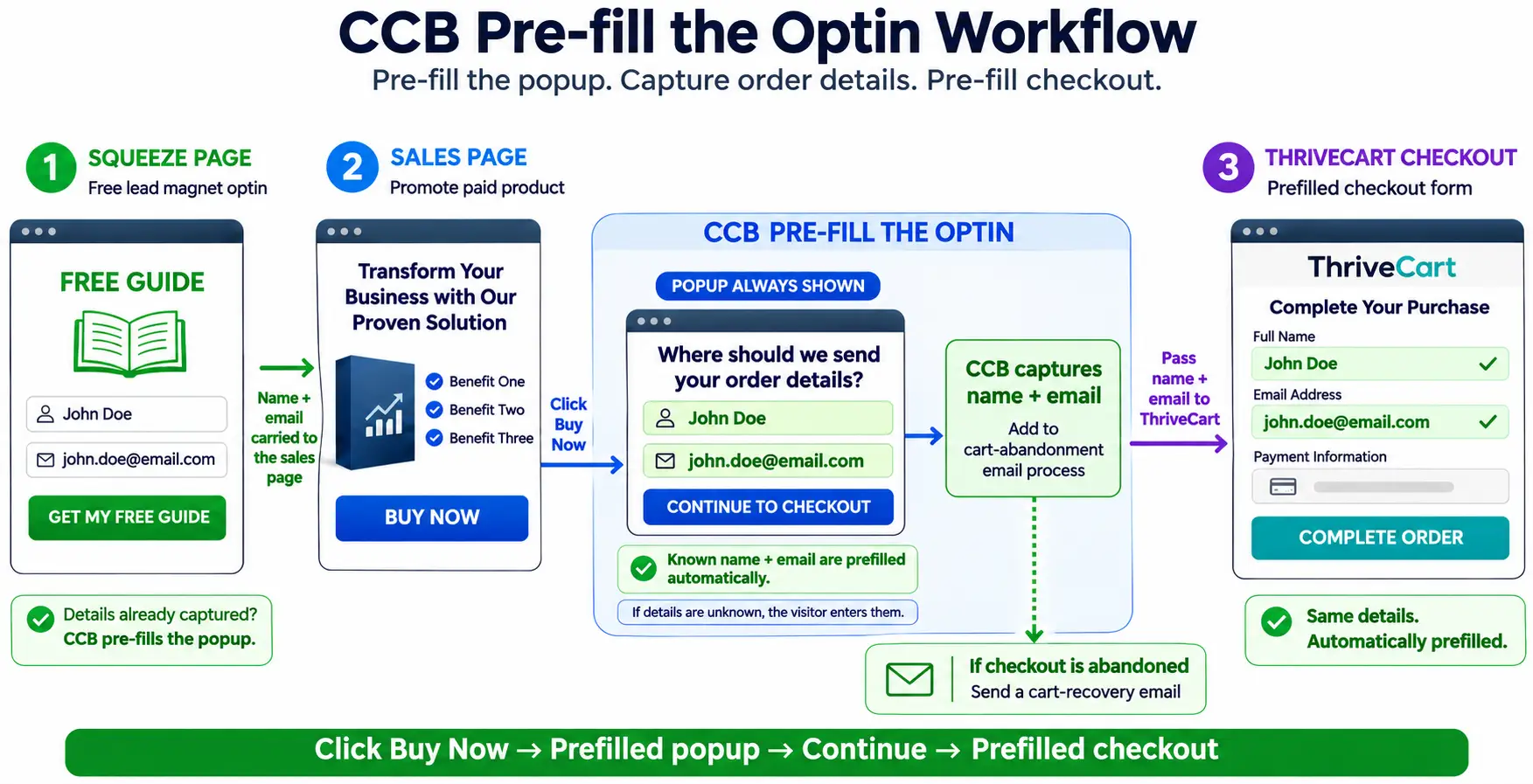
When they click Buy Now, the pop-up opens with their name and email already in it. They just click “Continue to checkout”. That one click adds them to your cart abandonment list and sends them on to a checkout that’s filled in too. If CCB doesn’t know them yet (say they arrived on the sales page from somewhere else), the pop-up is simply empty and they fill it in as normal. And anything a visitor types themselves is never overwritten.
Improvement 5 (better still): The Silent Opt-in
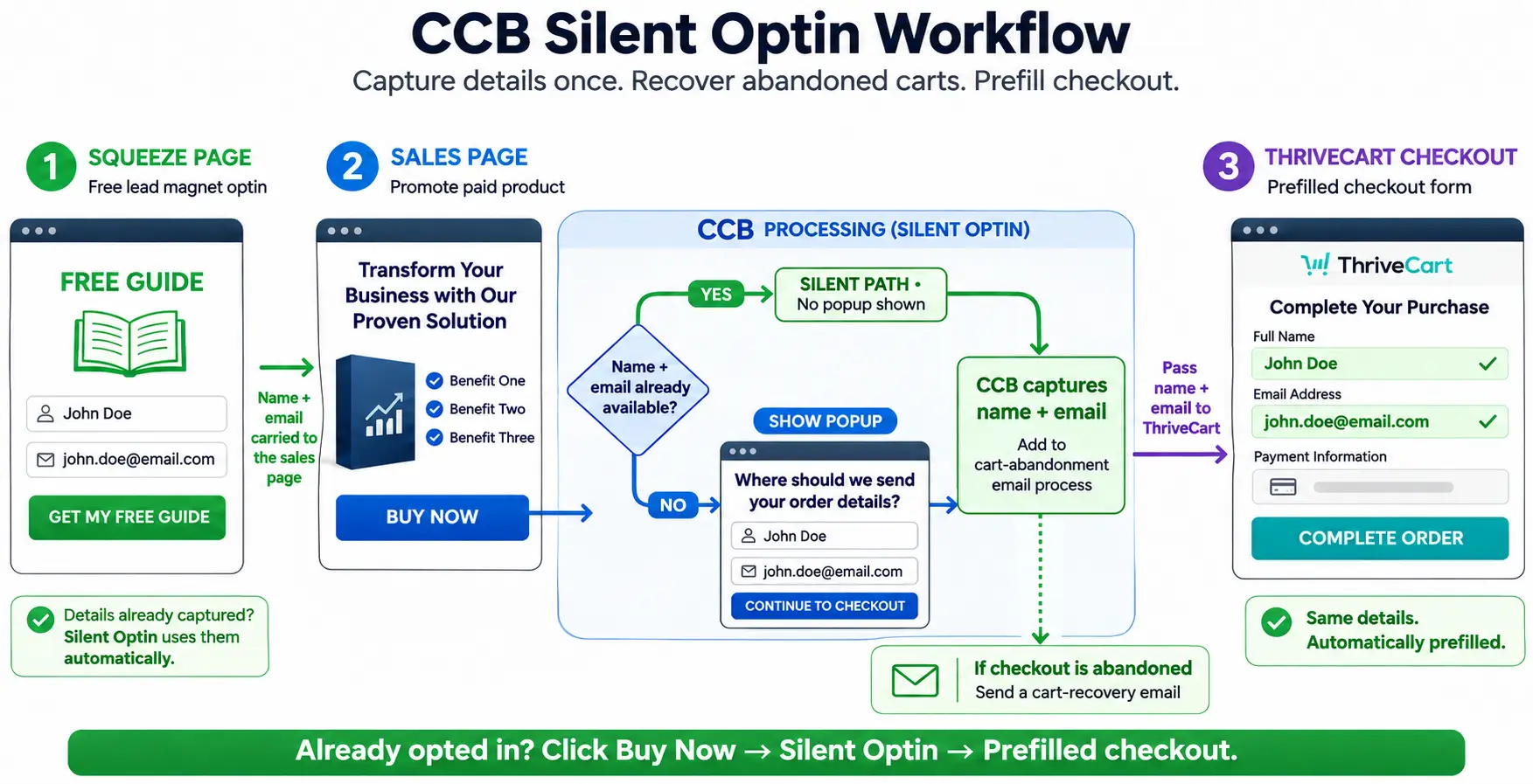
Now for the fun one. If Cart Conversion Boost already knows who someone is, why show them a pop-up at all?
With the Silent Opt-in, a known visitor clicks Buy Now and the pop-up never appears. Behind the scenes, CCB quietly submits the completed opt-in for them, so they still go into your cart abandonment list, and the next thing they see after the Buy button is straight to the checkout, pre-filled with their name and email.
It’s the VIP treatment: waved past the queue and straight to the till, while you still get everything you need to follow up.
And if the visitor isn’t known yet, or your form has something CCB can’t fill in for them (like a tick box or a captcha), the pop-up just shows as normal, and prefilled where it can. Nobody gets stuck.
Improvement 6: When visitors wander off (and they will)
Here’s the thing the neat diagrams don’t show: real people don’t walk through funnels in a straight line. They opt in, then read a blog post, then look at your other product, then make a cup of tea, then come back to the first one. Every time they meet another form, they’re asked to type their details all over again.
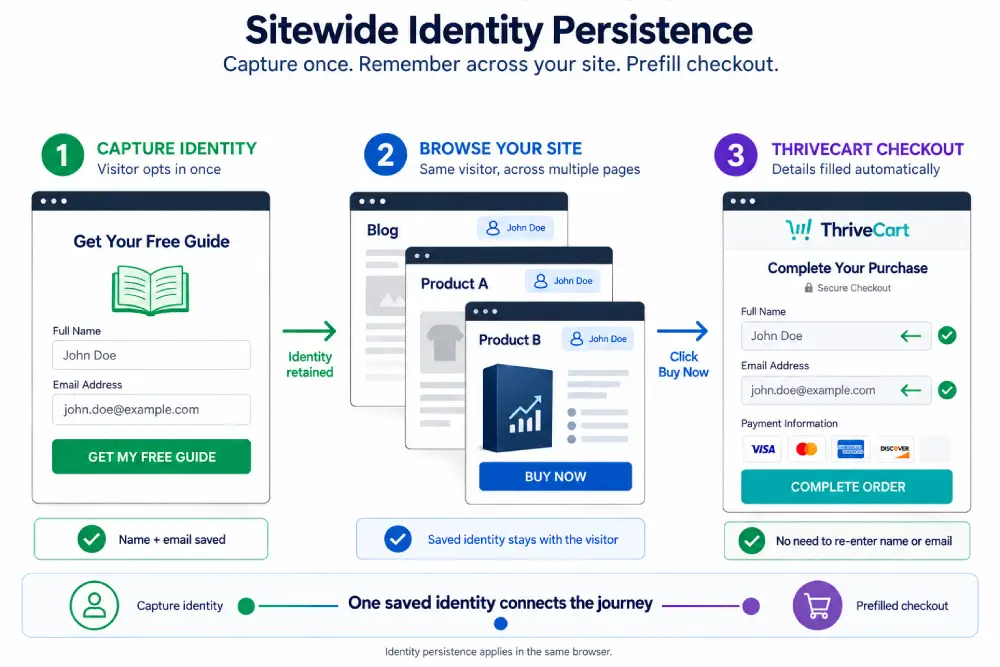
That’s what Sitewide Identity Persistence fixes. Once a visitor has given their name and email on any connected opt-in, Cart Conversion Boost remembers them as they move around your site.
Any later opt-in form or ThriveCart checkout they meet in that same browser session is filled in for them. Product A, Product B, a different opt-in, wherever they end up: they’re recognised.
The details are kept in the visitor’s own browser session (not a cookie, and not on your server), and they clear when the visitor closes the tab.
So which funnel should you use?
Keep it simple. If you run a 2-step funnel, put the opt-in pop-up on your Buy button (Improvement 2), so everyone who clicks Buy becomes a lead and the checkout arrives pre-filled.
If you run a 3-step funnel, add a cart opt-in on the Buy button for a separate cart abandonment list, and use Pre-fill the Opt-in or the Silent Opt-in so known visitors barely notice it.
Whichever you run, Sitewide Identity Persistence quietly smooths out every detour along the way.
What a leaky funnel costs you
Leaving things as they are costs nothing today, which is what makes it deceptive.
But every week, a funnel that doesn’t capture people before the cart lets a stream of interested buyers leave without a trace. Over a month, that’s a lot of people you’ll never be able to remind. Over a quarter, it’s a launch’s worth.
It stings most when it matters most: a launch you’ve spent weeks on, ad costs creeping up, or a quiet sales month you’d rather not repeat. Those are exactly the moments to make sure every checkout visitor counts.
In my own data, after adding a pre-cart opt-in with Cart Conversion Boost plus a follow-up sequence, 5-20% of the people who left the cart came back and bought, which works out at roughly 12-47% more sales. Your results will vary, but that’s extra sales from traffic you’re already getting. More sales. Same traffic.
Get your funnel working harder today
Cart Conversion Boost is a WordPress plugin. Your opt-in form captures the lead, and CCB is the bridge that carries the name and email into ThriveCart. It works with Elementor (free and Pro), Thrive Architect, Thrive Leads, Kit, Flodesk, MailerLite, Mailchimp, ActiveCampaign, AWeber, GetResponse, BirdSend, Contact Form 7, ConvertBox and more (the full list is on the Now works with page). No Zapier, no code.
The free plugin includes every feature in this post (pre-filled checkout, Pre-fill the Opt-in, the Silent Opt-in and Sitewide Identity Persistence), connected to one product. When you want it on more products, Pro gives you unlimited products.
Want to see the whole system, including the follow-up emails that bring abandoners back? Learn the 5 steps to boost your sales conversion.
Cart Conversion Boost is an independent tool and isn’t affiliated with Elementor, Thrive Themes or ThriveCart.
Leave a Reply