
Where Should We Send The Download Link To?
(Next step may take 6-7 seconds to load, while checking... )
And yes, you're seeing Cart Conversion Boost in action right now...
If your Buy button goes straight to ThriveCart, most of those people never give you a name or an email. So there's nobody to follow up with. Here's the small change that fixes that, and the free plugin that makes it painless.
of shoppers who reach a cart leave without buying.
Free for one product. Most people are live in about 5 minutes.
It's how the tutorials show it. Sales page, Buy button, ThriveCart checkout. Job done.
We hand-checked about 75 live stores running Thrive Themes with ThriveCart. Almost every one sends the buyer straight from the sales page to the cart, with nothing in between.
So if that's you, you're in good company, and you haven't done anything wrong. It just means your funnel has the same quiet leak as everybody else's.
Based on the 70.2% industry average. Your own number will differ.
About 30 of them pay. About 70 don't.
Those 70 aren't cold visitors. They read your sales page. They clicked Buy. They got as far as the checkout, card half out of the wallet... and then life happened. The kids screamed. The boss called. The doorbell rang. The WiFi froze.
Most of them meant to come back. Most of them won't. And you can't give them a nudge, because you never found out who they were.
That's the part that stings. You paid, in ad spend or in hours, to get every one of those people as far as your cart.
It does, and it's worth having switched on. The limit is in how it works. ThriveCart only records someone as a possible abandoned cart once they've filled in the name field and clicked out of it, then done the same with the email field. Anyone who leaves before that is gone. So it catches some of your abandoners and misses plenty.
The Cart Conversion Boost method captures 100% of all cart visitors.
Pop in your site and get a free report. Takes a couple of minutes.
Same page. Same product. Same traffic. You ask for the name and email before the cart, then send them on to pay.
Put a short opt-in between the Buy button and the checkout. Now every person who reaches your cart is someone you can email. That's 100% of all cart visitor leads, sitting in your email provider (MailerLite, ActiveCampaign, Mailchimp and the rest).
The form only pops up when they click Buy, so your page stays clean. And that click is a small yes, which makes the next yes easier.
Word it as the first step of buying. "Where should we send your login details?" reads like a checkout. "Join my list" reads like homework.
What your buyer sees when they click Buy.
It's the worry everyone has. I had it too. But think about who sees the form: someone who has just clicked Buy. They already expect to give a name and an email to get their order. You're asking for the same two things, one step earlier.
Thrive Themes and ThriveCart don't pass the name and email between them. It's like Thrive Themes sends the data in French, and ThriveCart is listening with German ears.
So your buyer types their details into your Thrive popup, lands on the ThriveCart checkout, and finds two empty boxes asking for the very same thing. Right when they've got their card out, your funnel looks like it wasn't listening.
That double entry is friction, and friction at the checkout costs sales.
The buyer has to retype what they just gave you.
Already filled in. All that's left is to pay.
It's a free WordPress plugin that sits between the two. Your opt-in captures the lead (and passes it into your email provider). Cart Conversion Boost pre-fills the ThriveCart checkout fields automatically.
Your buyer arrives at a checkout that already knows who they are.
Free for one product. You'll need Thrive Themes and ThriveCart.
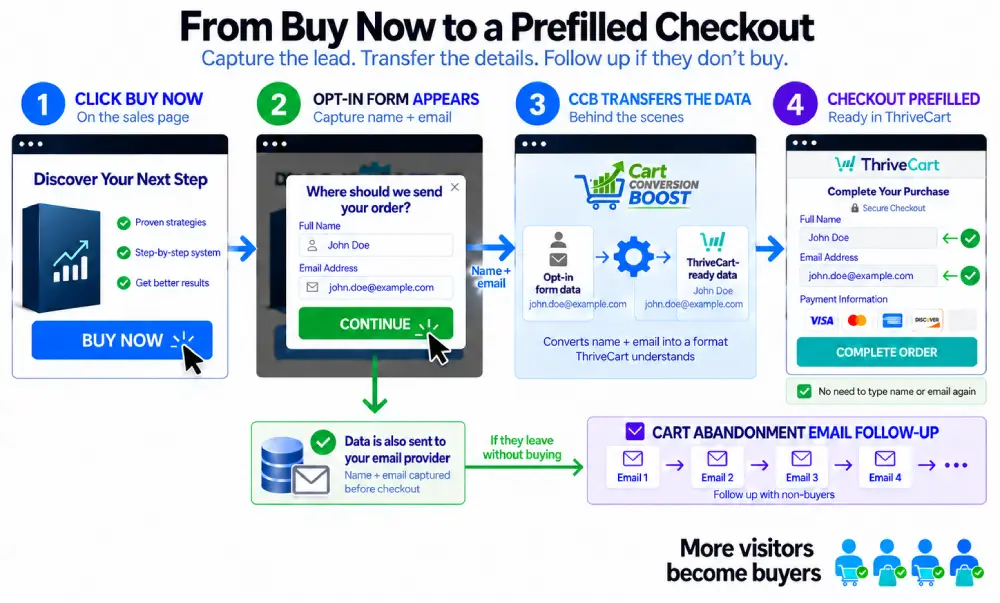
And the people who still don't buy? You've got their email now. Put them into a short follow-up sequence (a reminder, an answer to their main objection, a deadline) and take them out the moment they buy. They're the warmest leads you'll ever email.
You can try it on this page. The download form here runs on Cart Conversion Boost. Fill it in, and your details will be waiting for you on the next page.
Abandonment is the norm. Around 70.2% of shoppers who reach a cart leave without buying.
Baymard Institute, average across 50 studiesAbandoned-cart emails earn more revenue per recipient than any other automated email flow. They only work if you have the email.
Klaviyo benchmark, 143,000 flowsPeople who agree to a small request are more likely to agree to a bigger one. The click on your Buy button is that small yes.
Freedman & Fraser, 1966 (foot-in-the-door)The lift in completed sales we've seen in our own funnels from making this change. It's our internal data, so take it as a guide to what's possible.
Cart Conversion Boost internal data
Duncan R-EFounder, Cart Conversion Boost
I built this plugin for one of my own businesses first (it coaches marketing in a pet niche).
I realised that I was losing about 68% of my shopping cart visitors. They had got to the cart, they were interested, maybe about to buy... and then they walked away. Maybe they got distracted. The kids screamed. The boss called. The doorbell rang. And I had no idea who most of them were. No method to contact them, to get in touch, to entice them back to complete their order that they clearly had wanted to buy.
So I added a 2-step opt-in to the Buy button. Now I had names and emails, and I could follow up. Better. But the checkout was asking for the same details all over again, and first-time sales dipped slightly.
I hired a programmer to join the two up. Three days of back-and-forth and a few hundred dollars later, I had a coding script that worked... with a tricky bit of code I had to update by hand for every single product.
So I built a small plugin to do the translating instead. Something that was easy to install and manage, that pre-filled the checkout AND let me capture the lead pre-cart, so I could follow up with the cart abandon people.
Across a few different funnels, most of our tests came in at 5% to 20% more completed sales.
Then I figured you could use it too. I hope it helps.
Keep sending buyers straight to the cart, and keep losing the ones you never see leave. It costs nothing to set up. It just costs you the sales.
A custom integration will do it. Mine took three days and hundreds of dollars, and needed hand-editing for every new product. Zapier is the other route: another subscription, and more moving parts to look after.
Free to start. About five minutes to set up. The bridge is already built for you.
Get the free pluginConnect one product for free and see what it does for your sales. When you want it on a second product, Pro covers as many as you like.
The full plugin, connected to one product. Enough to see exactly what a pre-filled checkout does to your numbers.
| Sites | Annual | Lifetime |
|---|---|---|
| 1 site | $29 / year | $97 once |
| 5 sites | $67 / year | $197 once |
| 10 sites | $97 / year | $297 once |
Selling more than one product? Go straight to Pro. Otherwise start on Free and move up when you add product number two.
Get Pro for unlimited productsIn Free and in Pro. Nothing extra to buy. Click each one to see what it does.
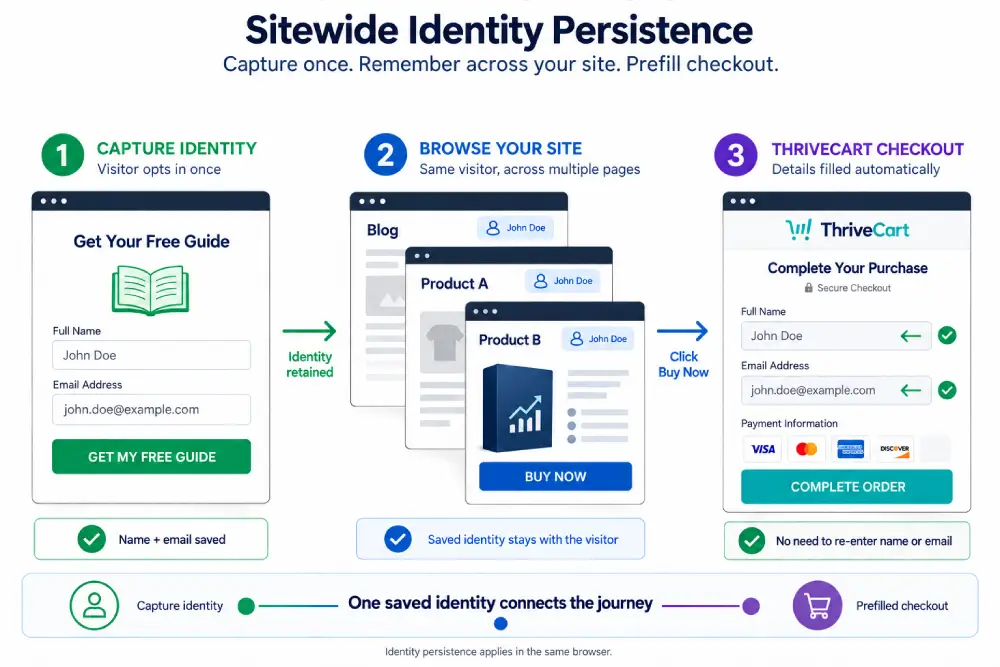
A visitor gives their name and email once, on any opt-in connected to Cart Conversion Boost. For the rest of that visit your site knows who they are, whichever page they go to next.
So if they wander off to read your About page, or look at a second product, they aren't treated as a stranger when they come back to the Buy button. It's also what makes the next two features possible.
The details are kept in the visitor's own browser session, not in a cookie.
This can also be used from your emails, so the link back to your site includes their name and email, and it all gets carried forward in this way with Sitewide Identity Persistence.
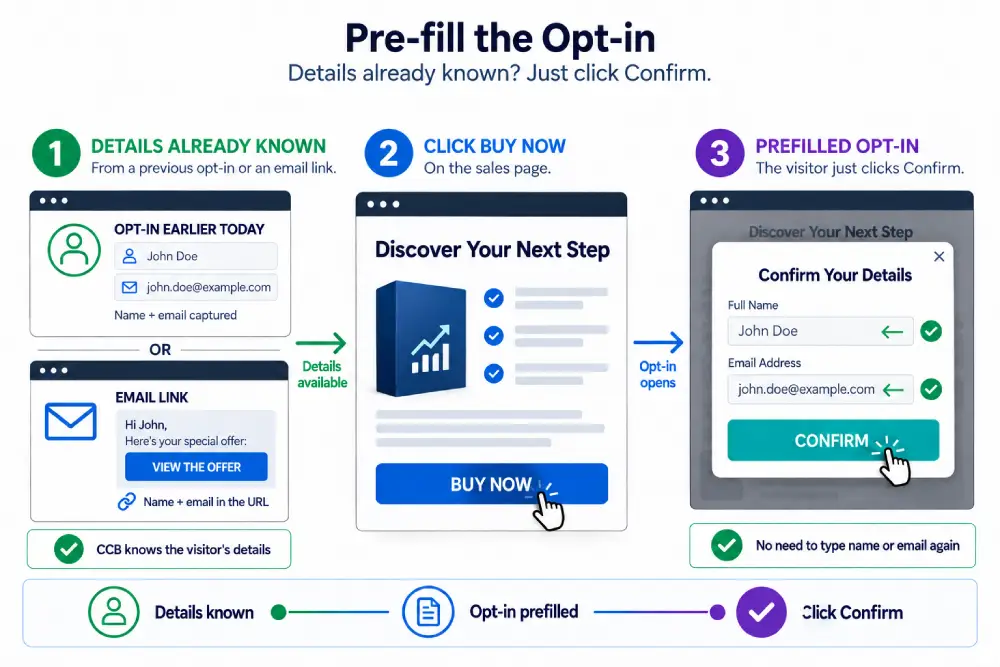
When a visitor who your site already knows clicks Buy, the opt-in opens with their name and email filled in. They glance at it, click once, and carry on to the checkout.
It's handy if you run a squeeze page before your sales page. They gave you their details at the first step, so the Buy button doesn't ask them to type it all again. This means you can add them to a separate email list for cart abandonment email follow-ups.
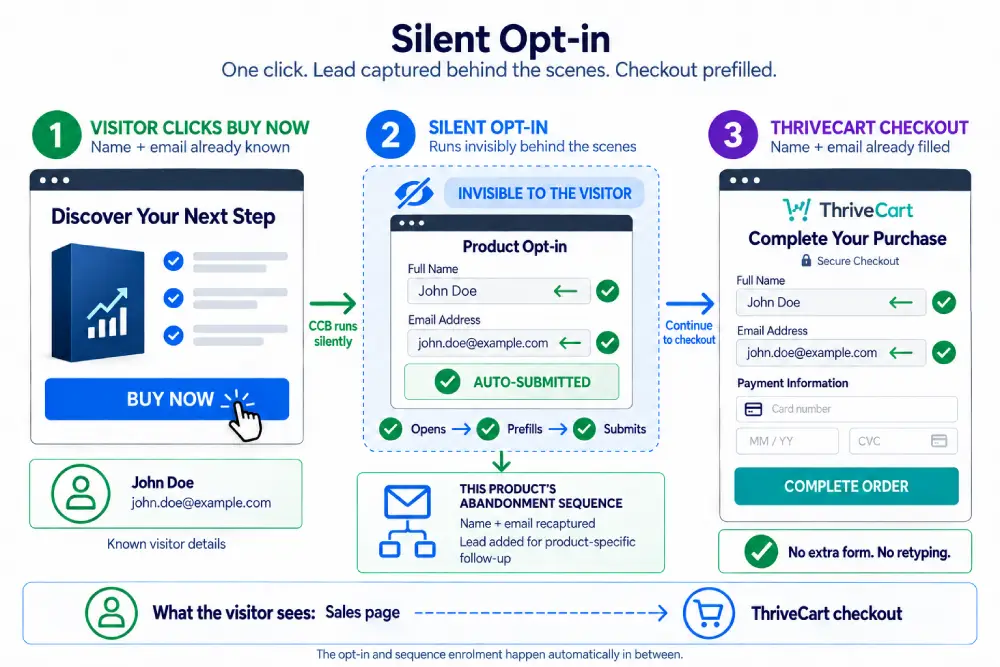
If your site already knows who the visitor is, they never see the popup. They click Buy, and the next thing they see is a checkout with their name and email filled in.
A good example is a link in one of your emails, or after a squeeze page. Someone on your list clicks through, reads the page, clicks Buy, and goes straight to a pre-filled cart. One less decision between them and the order.
The opt-in still happens behind the scenes, so they're in your follow-up sequence if they don't finish.
ThriveCart lets you put your checkout in three places, and Cart Conversion Boost pre-fills all three:
Product pages on ThriveCart.com. The standard hosted checkout page.
Embedded on your site. The cart sits inside one of your own pages.
On your own subdomain. The checkout runs on an address that belongs to your site.
So you don't have to change how your checkout is set up to use it.
There isn't one. The free version is the whole plugin, limited to one product. If you sell more than one, Pro covers unlimited products from $29 a year. That's how the plugin pays for itself. The free version allows you to use it at no cost, see all the features working, start to see your sales conversion rate improving, and then upgrade to Pro when you're ready to use it on your other products.
A WordPress site with Thrive Themes (Thrive Architect or Thrive Leads) and a ThriveCart account. If you run both, you're set.
Done badly, it could. A cold "sign up" form before the checkout, followed by a cart that asks for everything again, is extra work for the buyer. Done as a 2-step popup that feels like the first step of the order, and with the checkout pre-filled, the buyer types their details once. In our own funnels that combination lifted completed sales by 5-20%.
They do different jobs. A newsletter opt-in collects readers. This one sits on the Buy button, so it collects people who have already decided they want the product. If they don't finish the order, you know who to follow up with.
It has an abandoned cart feature, and it's worth using. It only records a visitor once they've completed the name field and clicked out of it, then done the same with the email field, so anyone who leaves earlier is missed. Capturing the lead before the cart means you have every cart visitor's details before the checkout even opens.
You could wire something up. It means another subscription and more moving parts to maintain. Cart Conversion Boost does this one job inside WordPress, and most people have it running in about 5 minutes.
Send everyone who opted in but didn't buy a short sequence: 3 to 5 emails over the first few days. A reminder, an answer to the main objection, then a deadline. Take people out of the sequence the moment they buy. Exactly how is outlined for you inside the Cart Conversion Boost step-by-step instructions.
If you can install a plugin and edit a Thrive form, you can do this. The setup videos show every click.
No. Cart Conversion Boost is an independent, third-party plugin. It isn't provided by or affiliated with Thrive Themes or ThriveCart.
The plugin is free. Setup takes about five minutes. And from then on, a buyer who wanders off is someone you can ask back.
Free for one product. For sellers using Thrive Themes and ThriveCart.

Cart Conversion Boost is NOT provided by ThriveThemes or ThriveCart. This is a 3rd-party bridging tool. Thrive Themes and ThriveCart are trademarks of their respective owners. Cart Conversion Boost is an independent product and is not affiliated with, endorsed by, or sponsored by Thrive Themes or ThriveCart.
Ashley Way, Harborough, LE16 7XD UK. Copyright 2026 , All rights reserved.